colorMapToSvg
Save a color map on file in svg (scalable vector graphics) format
信息
Syntax
Colors.colorMapToSvg(colorMap);Colors.colorMapToSvg(colorMap, fileName = "colorMap.svg", width = 10, // [mm] height = 100, // [mm] x = 20, // [mm] y = 10, // [mm] T_min = 0, T_max = 100, nScalars = 11, format = ".3g", fontSize = 11, // [pt] textWidth = 8, // [mm] caption = "", headerType = Colors.colorMapToSvg.Header.svgBeginAndEnd) // svgBegin // svgEnd // svgNoHeader
Description
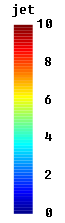
This function saves the color map "Real colorMap[:,3]" on file "fileName"in svg format. The color map has a width of "width" and a height of "height" andthe upper left corner is placed at coordinates "(x,y)".Over the color map, a caption "caption" is placed.On the right side of the color map, a set of scalar field values T isdisplayed where "T_min" is placed at colorMap[1,:],"T_max" is placed at colorMap[end,:] and "nScalars" values between"T_min" and "T_max" (including T_min and T_max) are shown.The printing format of the numbers is defined with "format", see definition below.With argument "headerType" it is defined whether "svg" begin and endlines are printed. If the "begin" svg tag shall be printed, file "fileName"is deleted, if it already exists. Otherwise, all output is appended to thefile "fileName".
A "svg" file can be displayed by a web browser, such asFirefox by dragging thefile in the browser window.Alternatively, a svg-file can be loaded in a graphics program,such as the free Inkscape,can be manipulated and can be exported in other graphic formats.The following image was generated with a call to "colorMapToSvg", thegenerated file was loaded in Inkscape and exported in "png" format:
The "format" argument defines the string formatting according toANSI-C without "%" and "*" character
(e.g., ".6g", "14.5e", "+6f"). In particular:
format = "[<flags>] [<width>] [.<precision>] <conversion>"with
<flags> zero, one or more of
"-": left adjustment of the converted number
"+": number will always be printed with a sign
"0": padding to the field width with leading zeros<width> Minimum field width. The converted number will be printed in a field at
least this wide and wider if necessary. If the converted number has
fewer characters it will be padded on the left (or the right depending
on <flags>) with blanks or 0 (depending on <flags>).<precision> The number of digits to be printed after the decimal point for
e, E, or f conversions, or the number of significant digits for
g or G conversions.<conversion> = "e": Exponential notation using a lower case e
= "E": Exponential notation using an upper case E
= "f": Fixed point notation
= "g": Either "e" or "f"
= "G": Same as "g", but with upper case E
嵌套类
| 名称 | 描述 |
|---|---|
| HeaderType |