# 赋值与拷贝
一些科学计算语言使用按值传递(Call by value),如 MATLAB,尽管这样做可以防止数组在被调函数中被意外地篡改,但这也会导致不必要的数组拷贝。为了避免不必要的数据副本,MATLAB 采用写入时复制技术(Copy-On-Write)。同时,为了使得多个变量都可以访问或修改同一个底层对象,MATLAB 又提供了句柄对象(handle)。
与 MATLAB 不同,目前大多数现代语言都采用共享调用技术(Call by sharing),包括 CLU、Java、Python、Ruby 等,Julia 也是采用共享调用技术。
# 赋值
类似于 Python,Julia 的赋值操作实质上是变量绑定,即将一个变量存储的其变量值对象的地址赋给一个变量,如下图所示:
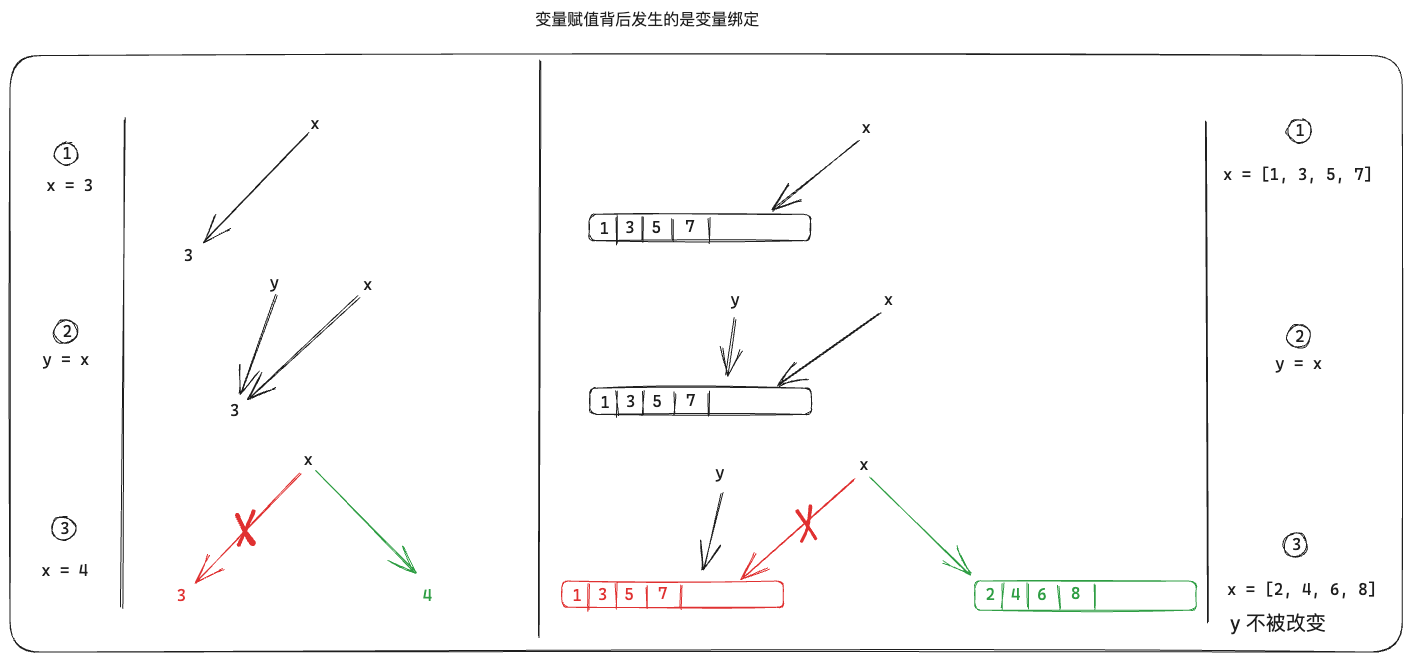
对于一些基础类型,包括Number、Tuple、String等,由于其对象的值不可更改(如字符串),所以在赋值与传参时,表现上与按值传递没有区别,感觉像拷贝。
# 数值标量
x = 1
y = x
x = 2
y  # 1

# 元组
x = (1, 2)
y = x
x = (3, 4)
y  # (1, 2)

# 字符串
x = "abc"
y = x
x = "edf"
y # "abc"
对于一些可变复合类型(使用ismutable判断),包括数组、字典、可变结构体等,若内部数据被修改了,所有共享该对象的变量都会跟着变化,如下图所示。
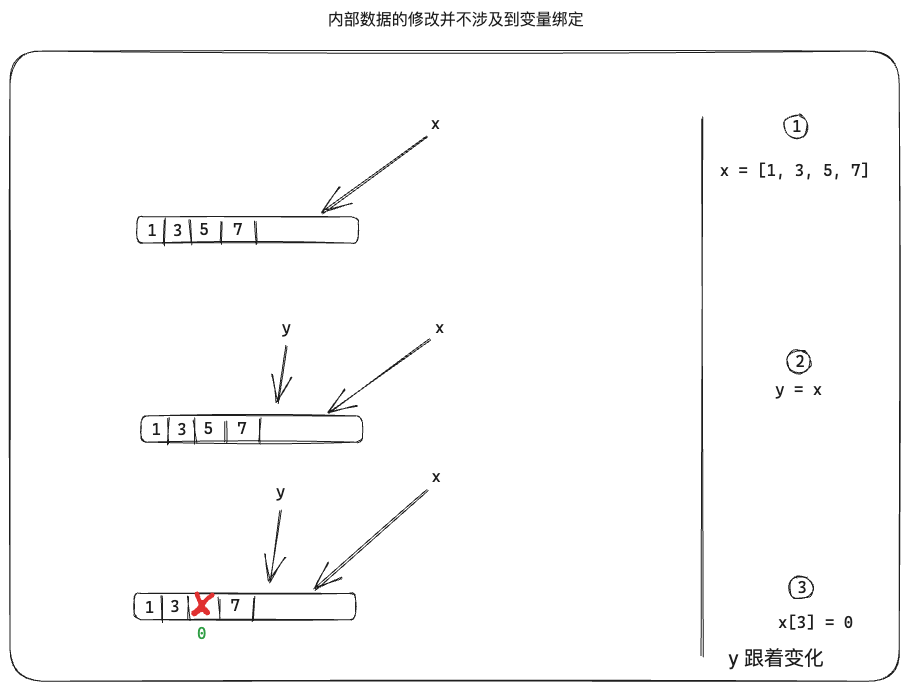
数组示例:
x = [1, 2, 3]
y = x # x与y都指向同一个地址
pointer_from_objref(x) == pointer_from_objref(y) # true
push!(x, 4) # [1, 2, 3, 4],此时x地址没有改变
y # [1, 2, 3, 4]

x = [4,5,6] # 此时x地址发生改变
pointer_from_objref(x) == pointer_from_objref(y) # false
y # [1, 2, 3, 4]
字典示例:
x = Dict("A" => 1, "B" => 2)
y = x # x与y都指向同一个地址
pointer_from_objref(x) == pointer_from_objref(y) #true
x["C"] = 3
y # Dict("B" => 2, "A" => 1, "C" => 3)

x = Dict("AA" => 11, "BB" => 22) # 此时x地址发生改变
pointer_from_objref(x) == pointer_from_objref(y) #false
y # Dict("B" => 2, "A" => 1, "C" => 3)
可变结构体示例:
mutable struct Point
    x::Float64
    y::Float64
end

p1 = Point(1, 2)
p2 = p1 # p1和p2指向同一个地址
pointer_from_objref(p1) == pointer_from_objref(p2) # true
p1.x = 0.5 # 此时p1地址没有改变,但其内容被修改
p2 # Point(0.5, 2.0)

p1 = Point(11, 22) # 此时p1地址发生改变
pointer_from_objref(p1) == pointer_from_objref(p2) # false
p2 # Point(0.5, 2.0)
# 浅拷贝
copy(x)表示创建一个 x 的浅拷贝,外部结构被复制,但不是全部内部值。例如,复制一个数组将生成一个新数组,新数据与原数组具有完全相同的元素。
数组示例:
x = Float64[1 2 3; 4 5 6]
y = copy(x)
pointer_from_objref(x) == pointer_from_objref(y) # false
x[1] = -1
x # [-1.0 2.0 3.0; 4.0 5.0 6.0]
y # [1.0 2.0 3.0; 4.0 5.0 6.0],不受x影响
由于浅拷贝只会复制外壳而不会复制内部数据,所以对于数组嵌套数组情况,用户需要自行决定是否使用。
分块矩阵示例:
mtx11 = [11 12 13;
         21 22 23]
mtx12 = [14 15;
         24 25]
mtx21 = [31 32 33;
         41 42 43]
mtx22 = [34 35;
         44 45]

# 创建分块矩阵
mtx_mtx = [[mtx11] [mtx12]; [mtx21] [mtx22]]
#=
2×2 Matrix{Matrix{Int64}}:
 [11 12 13; 21 22 23]  [14 15; 24 25]
 [31 32 33; 41 42 43]  [34 35; 44 45]
=#

mtx_mtx_copy = copy(mtx_mtx)
pointer_from_objref(mtx_mtx_copy) == pointer_from_objref(mtx_mtx) # false

# 浅拷贝不会复制内部数据,所以两者指向同一个地址
pointer_from_objref(mtx_mtx[1, 1]) == pointer_from_objref(mtx11) # true
pointer_from_objref(mtx_mtx_copy[1,1]) == pointer_from_objref(mtx11) #true

# 修改分块矩阵的某个元素值
mtx11[1] = -11

mtx_mtx
#=
2×2 Matrix{Matrix{Int64}}:
 [-11 12 13; 21 22 23]  [14 15; 24 25]
 [31 32 33; 41 42 43]   [34 35; 44 45]
=#

mtx_mtx_copy
#=
2×2 Matrix{Matrix{Int64}}:
 [-11 12 13; 21 22 23]  [14 15; 24 25]
 [31 32 33; 41 42 43]   [34 35; 44 45]
=#
# 深拷贝
deepcopy(x)表示创建 x 的深层副本,所有内容都会递归复制,从而产生完全独立的对象。例如,深度复制数组会生成一个新数组,其元素是原始元素的深度副本。对对象调用 deepcopy 通常应该与序列化然后反序列化具有相同的效果。
不妨以分块矩阵为例:
mtx11 = [11 12 13;
         21 22 23]
mtx12 = [14 15;
         24 25]
mtx21 = [31 32 33;
         41 42 43]
mtx22 = [34 35;
         44 45]

# 创建分块矩阵
mtx_mtx = [[mtx11] [mtx12]; [mtx21] [mtx22]]
#=
2×2 Matrix{Matrix{Int64}}:
 [11 12 13; 21 22 23]  [14 15; 24 25]
 [31 32 33; 41 42 43]  [34 35; 44 45]
=#

mtx_mtx_copy = deepcopy(mtx_mtx)
pointer_from_objref(mtx_mtx_copy) == pointer_from_objref(mtx_mtx) # false

# 深拷贝会产生完全独立的对象,所以两者指向不同地址
pointer_from_objref(mtx_mtx[1, 1]) == pointer_from_objref(mtx11) # true
pointer_from_objref(mtx_mtx_copy[1,1]) == pointer_from_objref(mtx11) # false

# 修改分块矩阵的某个元素值
mtx11[1] = -11

mtx_mtx
#=
2×2 Matrix{Matrix{Int64}}:
 [-11 12 13; 21 22 23]  [14 15; 24 25]
 [31 32 33; 41 42 43]   [34 35; 44 45]
=#

mtx_mtx_copy # 与mtx_mtx是两个完全独立的对象,所以不受影响
#=
2×2 Matrix{Matrix{Int64}}:
 [11 12 13; 21 22 23]  [14 15; 24 25]
 [31 32 33; 41 42 43]  [34 35; 44 45]
=#
# 典型案例
这是一个真实场景的简化示例,主要是用来创建分块矩阵。但是在创建过程中,容易按值传递思维来编写代码,导致所有分块矩阵都指向同一个内存对象,从而最终结果出现错误。
function Test11()
    Dim = 2
    Y = Matrix{Matrix{ComplexF64}}(undef, Dim, 1)

    MatTmp = zeros(ComplexF64, 2, 1)
    B1 = [1 + 2im; 3 + 4im]
    B2 = [5 + 6im; 7 + 8im]

    for i = 1:Dim
        if i == 1
            MatTmp[1] = B1[1]
            MatTmp[2] = B1[2]
        else
            MatTmp[1] = B2[1]
            MatTmp[2] = B2[2]
        end
        Y[i] = reshape(MatTmp, 2, 1) # 查看reshape帮助,reshape返回数组与原数组共享同一个内存数据
    end
    return Y
end

Y = Test11() # error:Y[i]都指向了同一个内存地址,与MatTmp指向地址相同
#=
2×1 Matrix{Matrix{ComplexF64}}:
 [5.0 + 6.0im; 7.0 + 8.0im;;]
 [5.0 + 6.0im; 7.0 + 8.0im;;]
=#
对于该问题,解决方法有很多,比如将MatTmp = zeros(ComplexF64, 2, 1)放在 for 循环内部,或使用拷贝Y[i] = copy(reshape(MatTmp, 2, 1))等,修改如下:
function Test11()
    Dim = 2
    Y = Matrix{Matrix{ComplexF64}}(undef, Dim, 1)

    B1 = [1 + 2im; 3 + 4im]
    B2 = [5 + 6im; 7 + 8im]

    for i = 1:Dim
        MatTmp = zeros(ComplexF64, 2, 1) # 每次循环创建一个数组,避免分块矩阵之间共享
        if i == 1
            MatTmp[1] = B1[1]
            MatTmp[2] = B1[2]
        else
            MatTmp[1] = B2[1]
            MatTmp[2] = B2[2]
        end
        Y[i] = reshape(MatTmp, 2, 1)
    end
    return Y
end

Y = Test11()
#=
2×1 Matrix{Matrix{ComplexF64}}:
 [1.0 + 2.0im; 3.0 + 4.0im;;]
 [5.0 + 6.0im; 7.0 + 8.0im;;]
=#