# 二维热传导方程计算
关于二维热方程计算生成动态库 Python 调用示例
# 概述
二维热传导方程是描述热量在二维空间中传导过程的偏微分方程。它是热力学中的基本方程之一,用于模拟或描述涉及热传导的物理现象。该方程描述了空间中温度分布随时间的演变。
热传导方程的一般形式如下:
其中:
是温度分布的函数,表示在坐标 处和时间 时的温度; 是时间 的温度变化率; 和 是分别表示在 方向和 方向上的温度梯度的二阶偏导数; 是热传导系数,表示介质的导热性能。
上述方程描述了一个区域内的温度如何随时间变化。
我们接下来给出一个基于有限差分法(Finite Difference Method)的二维热传导方程数值模拟。有限差分法是一种数值解偏微分方程的方法,通过将连续的空间和时间划分为离散的网格,将偏导数用差分逼近来近似求解。
我们为该模拟编写了simulate!函数,将该 Julia 函数生成动态库,并用 Python 调用动态库,绘制结果。
# Julia 生成动态库
新建 build.jl 文件,输入以下代码:
function simulate!(pU::Ptr{Cdouble}, pu::Ptr{Cdouble}, Nx, Ny, Nt, α, dx, dy, dt)
    try
        U = unsafe_wrap(Array, pU, (Nx, Ny, Nt); own=false)
        u = unsafe_wrap(Array, pu, (Nx, Ny); own=false)
        simulate!(U, u, Nx, Ny, Nt, α, dx, dy, dt)
        return true
    catch
        return false
    end
end

function simulate!(U::Array, u::Matrix, Nx, Ny, Nt, α, dx, dy, dt)
    u = reshape(u, size(u)..., 1)
    u = @view u[:, :, 1]

    # 有限差分法的时间迭代
    for n in 1:Nt
        u_new = @view U[:, :, n]
        u_new .= u
        for i in 2:(Nx-1)
            for j in 2:(Ny-1)
                u_new[i, j] = u[i, j] + α * dt / dx^2 * (u[i+1, j] - 2 * u[i, j] + u[i-1, j]) +
                              α * dt / dy^2 * (u[i, j+1] - 2 * u[i, j] + u[i, j-1])
            end
        end
        u = u_new
    end
end

@static if @isdefined(SyslabCC)
    SyslabCC.static_compile(
        "simulate", simulate!,
        Ptr{Cdouble}, Ptr{Cdouble},         # U 和 u
        Int64, Int64, Int64,                # Nx, Ny, Nt
        Cdouble, Cdouble, Cdouble, Cdouble, # α, dx, dy, dt
    )
end
在这个具体的实现中,simulate! 函数接受指向模拟所需内存块的指针 pU 和 pu,以及其他模拟参数,如空间网格尺寸 Nx、Ny,时间步长 Nt,以及相关的物理参数 α、dx、dy 和 dt。函数通过 unsafe_wrap 将指针包装成数组,并调用内部的 simulate! 函数进行具体的数值模拟。
simulate! 函数的核心是有限差分法的时间迭代部分,其中通过嵌套的循环遍历空间网格的每个点,并根据有限差分法的数值逼近更新每个点的值。这个过程在时间上进行了 Nt 步,模拟了热方程的演化。
为了提高性能,函数采用了一些优化手段,如使用 @view 宏来避免不必要的数组复制。最终,函数返回一个布尔值,表示模拟是否成功完成。
接下来,我们调用 scc 命令生成动态库:
scc build.jl -o libheat.dll --bundle
# Linux 命令:
# scc build.jl -o libheat.so --bundle
Windows 平台上生成的文件结构如下:
...
    .syslabcc-cache/
    lib/
    bdwgc.dll
    build.jl
    libheat.dll
    libheat.lib
    syslabcrt-dylib.lib
    syslabcrt-io.lib
...
# Python 调用动态库
Python 调用方式如下,新建 test.py 写入以下代码,需注意区分不同平台的路径写法:
# -*- coding: utf-8 -*-
import ctypes
import numpy as np
import os
import matplotlib.animation as animation
from matplotlib import pyplot as plt

# 载入动态链接库
if os.name == 'nt':
    dll = ctypes.cdll.LoadLibrary("./libheat.dll")
else:
    # Linux 下加载动态库:
    dll = ctypes.cdll.LoadLibrary("./libheat.so")

dll.simulate.argtypes = [
    ctypes.POINTER(ctypes.c_double),  # U
    ctypes.POINTER(ctypes.c_double),  # u
    ctypes.c_int64,  # Nx
    ctypes.c_int64,  # Ny
    ctypes.c_int64,  # Nt
    ctypes.c_double,  # alpha
    ctypes.c_double,  # dx
    ctypes.c_double,  # dy
    ctypes.c_double,  # dt
]
dll.simulate.restype = ctypes.c_uint8

α = 0.01  # 热扩散率
dx = 0.1  # 空间步长
dy = 0.1  # 空间步长
dt = 0.01  # 时间步长
Nx = 10  # 网格点数(X 方向)
Ny = 10  # 网格点数(Y 方向)
Nt = 100  # 时间步数

# 初始化温度分布数组
U = np.zeros([Nt, Ny, Nx], dtype=np.double)  # Python 数组是行优先的,维度逆序
u = np.zeros([Ny, Nx], dtype=np.double)

# 边界条件设置:四周边界保持一定温度
u[0, :] = 10
u[-1, :] = 10
u[:, 0] = 10
u[:, -1] = 10

pointer_of_U = U.ctypes.data_as(ctypes.POINTER(ctypes.c_double))
pointer_of_u = u.ctypes.data_as(ctypes.POINTER(ctypes.c_double))

if not dll.simulate(pointer_of_U, pointer_of_u, Nx, Ny, Nt, α, dx, dy, dt):
    print("模拟失败,Julia 程序返回错误")
    exit(1)

# 绘制图像

U = U.transpose()
u = u.transpose()

fig, ax = plt.subplots()
frame = ax.imshow(U[:, :, 0], cmap="plasma")  # 使用适当的颜色映射

ax.set_xlabel("X axis")
ax.set_ylabel("Y axis")
ax.set_title("Heat Distribution")


# 更新帧的函数
def update_frame(i):
    frame.set_data(U[:, :, i])
    return (frame,)


# 创建动画
ani = animation.FuncAnimation(fig, update_frame, frames=Nt, blit=True)
writergif = animation.PillowWriter(fps=30)
ani.save("simulation.gif", writer=writergif)

plt.show()
运行:
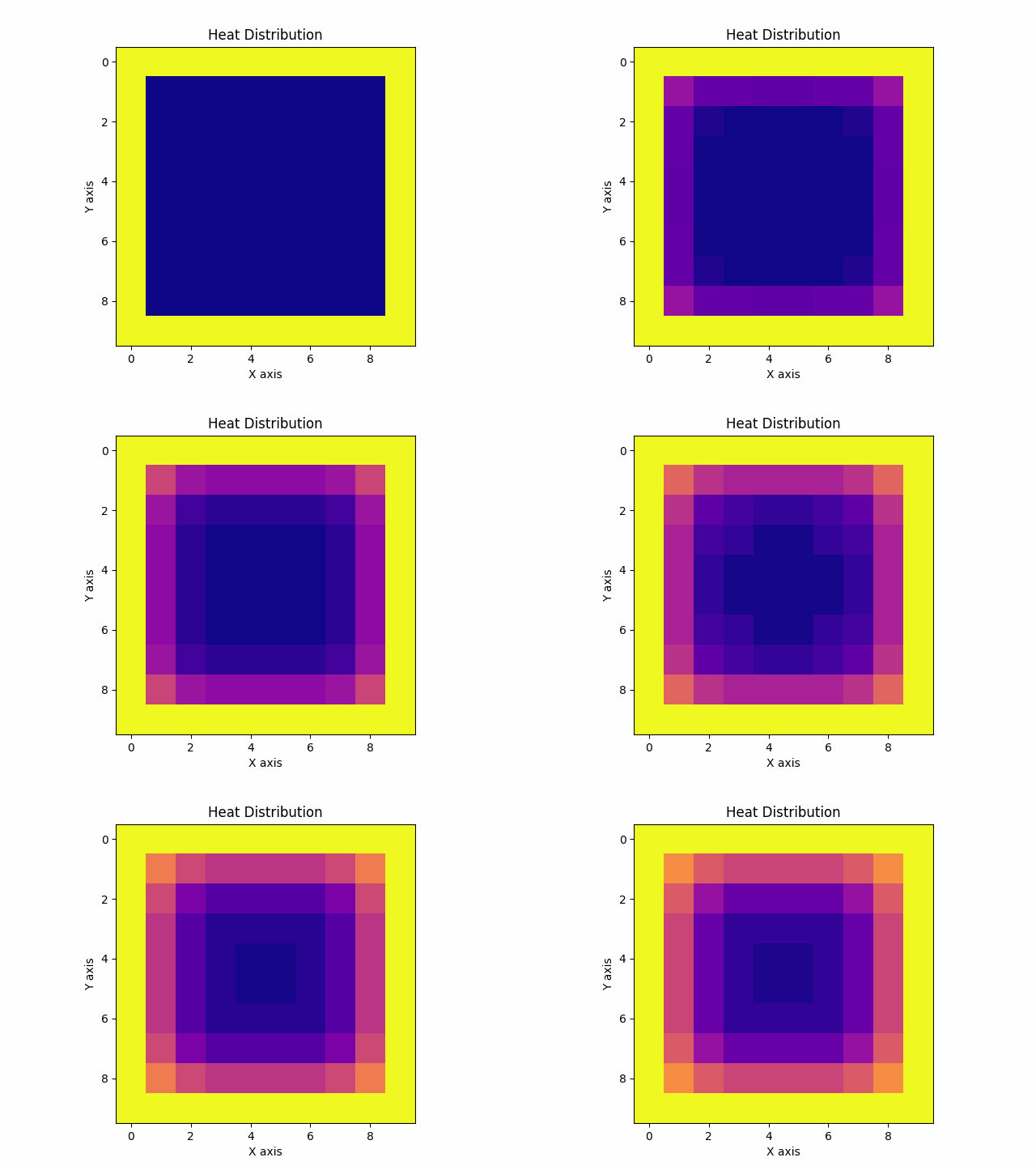
python test.py
生成的 simulation.gif 图像如下: