# style_type
样式
# 表格样式
报告生成支持创建应用多种表格样式
# 不使用模板创建报告支持的表格样式
不使用模板创建报告,支持的表格样式为:
| tablestyle | 表格样式 |
|---|---|
| Normal Table |  |
| Table Grid |  |
| Light Shading |  |
| Light Shading Accent 1 |  |
| Light Shading Accent 2 |  |
| Light Shading Accent 3 |  |
| Light Shading Accent 4 |  |
| Light Shading Accent 5 |  |
| Light Shading Accent 6 |  |
| Light List |  |
| Light List Accent 1 |  |
| Light List Accent 2 |  |
| Light List Accent 3 |  |
| Light List Accent 4 |  |
| Light List Accent 5 |  |
| Light List Accent 6 |  |
| Light Grid |  |
| Light Grid Accent 1 |  |
| Light Grid Accent 2 |  |
| Light Grid Accent 3 |  |
| Light Grid Accent 4 |  |
| Light Grid Accent 5 |  |
| Light Grid Accent 6 |  |
| Medium Shading 1 |  |
| Medium Shading 1 Accent 1 |  |
| Medium Shading 1 Accent 2 |  |
| Medium Shading 1 Accent 3 |  |
| Medium Shading 1 Accent 4 |  |
| Medium Shading 1 Accent 5 |  |
| Medium Shading 1 Accent 6 |  |
| Medium Shading 2 |  |
| Medium Shading 2 Accent 1 |  |
| Medium Shading 2 Accent 2 |  |
| Medium Shading 2 Accent 3 |  |
| Medium Shading 2 Accent 4 |  |
| Medium Shading 2 Accent 5 |  |
| Medium Shading 2 Accent 6 |  |
| Medium Grid 1 |  |
| Medium Grid 1 Accent 1 |  |
| Medium Grid 1 Accent 2 |  |
| Medium Grid 1 Accent 3 |  |
| Medium Grid 1 Accent 4 |  |
| Medium Grid 1 Accent 5 |  |
| Medium Grid 1 Accent 6 |  |
| Medium Grid 2 |  |
| Medium Grid 2 Accent 1 |  |
| Medium Grid 2 Accent 2 |  |
| Medium Grid 2 Accent 3 |  |
| Medium Grid 2 Accent 4 |  |
| Medium Grid 2 Accent 5 |  |
| Medium Grid 2 Accent 6 |  |
| Medium Grid 3 |  |
| Medium Grid 3 Accent 1 |  |
| Medium Grid 3 Accent 2 |  |
| Medium Grid 3 Accent 3 |  |
| Medium Grid 3 Accent 4 |  |
| Medium Grid 3 Accent 5 |  |
| Medium Grid 3 Accent 6 |  |
| Dark List |  |
| Dark List Accent 1 |  |
| Dark List Accent 2 |  |
| Dark List Accent 3 |  |
| Dark List Accent 4 |  |
| Dark List Accent 5 |  |
| Dark List Accent 6 |  |
| Colorful Shading |  |
| Colorful Shading Accent 1 |  |
| Colorful Shading Accent 2 |  |
| Colorful Shading Accent 3 |  |
| Colorful Shading Accent 4 |  |
| Colorful Shading Accent 5 |  |
| Colorful Shading Accent 6 |  |
| Colorful List |  |
| Colorful List Accent 1 |  |
| Colorful List Accent 2 |  |
| Colorful List Accent 3 |  |
| Colorful List Accent 4 |  |
| Colorful List Accent 5 |  |
| Colorful List Accent 6 |  |
| Colorful Grid |  |
| Colorful Grid Accent 1 |  |
| Colorful Grid Accent 2 |  |
| Colorful Grid Accent 3 |  |
| Colorful Grid Accent 4 |  |
| Colorful Grid Accent 5 |  |
| Colorful Grid Accent 6 |  |
# 语法
style = Dict("style_type"=>"Colorful Grid Accent 1")
# 示例
修改表格样式
创建一个表格,修改表格样式为"Colorful Grid Accent 1"。
using TyReportGenerator

doc = create_document()

number = [1, 2, 3, 4, 5]
names = ["fft", "fftshift", "ifft", "ifftshift", "nextpow2"];
statements = [
    "傅里叶变换", "将零频分量移到频谱中心", "傅里叶逆变换", "将零频分量移到频谱中心", "2的更高次幂的指数"
];
tableData = [number, names, statements]

table = create_table(
    tableData;
    style=Dict(
        "style_type" => "Colorful Grid Accent 1",
        "halign" => "center",
        "font_family" => "Times New Roman",
        "outer_margin" => (0, 0),
    ),
)

add_table(doc, table)

doc_file = joinpath(tempdir(), "自定义表格样式.docx");

#生成文档报告
generate_report(doc, doc_file)
rptview(doc_file)
# 使用同元提供的模板创建报告支持的表格样式
使用同元提供的模板创建报告时,支持的表格样式为:
| style_type | 表格样式 |
|---|---|
| Normal Table | |
| Table Grid | |
| Medium Shading 2 Accent 5 | |
| 简单样式 - 行 |  |
| 简单样式 - 列 |  |
| 简单样式 - 网格 |  |
| 代码框 |  |
# 语法
style = Dict("style_type"=>"简单样式 - 行")
# 示例
修改表格样式
创建一个表格,修改表格样式为"简单样式 - 行"。
using TyReportGenerator

doc = create_document()
pkg_dir = pkgdir(TyReportGenerator)
number = [1, 2, 3, 4, 5]
names = ["fft", "fftshift", "ifft", "ifftshift", "nextpow2"];
statements = [
    "傅里叶变换", "将零频分量移到频谱中心", "傅里叶逆变换", "将零频分量移到频谱中心", "2的更高次幂的指数"
];
tableData = [number, names, statements]

table = create_table(
    tableData;
    style=Dict(
        "style_type" => "简单样式 - 行",
        "halign" => "center",
        "font_family" => "Times New Roman",
        "outer_margin" => (0, 0),
    )
)

add_table(doc, table)

doc_file = joinpath(tempdir(), "自定义表格样式.docx");
tpl_file = joinpath(pkg_dir, "examples/Resources/文档模板-空.docx");
#生成文档报告
generate_report(doc, doc_file, tpl_file)
rptview(doc_file)
# 自定义表格样式
报告生成支持在word中自定义表格样式
# 自定义表格样式过程
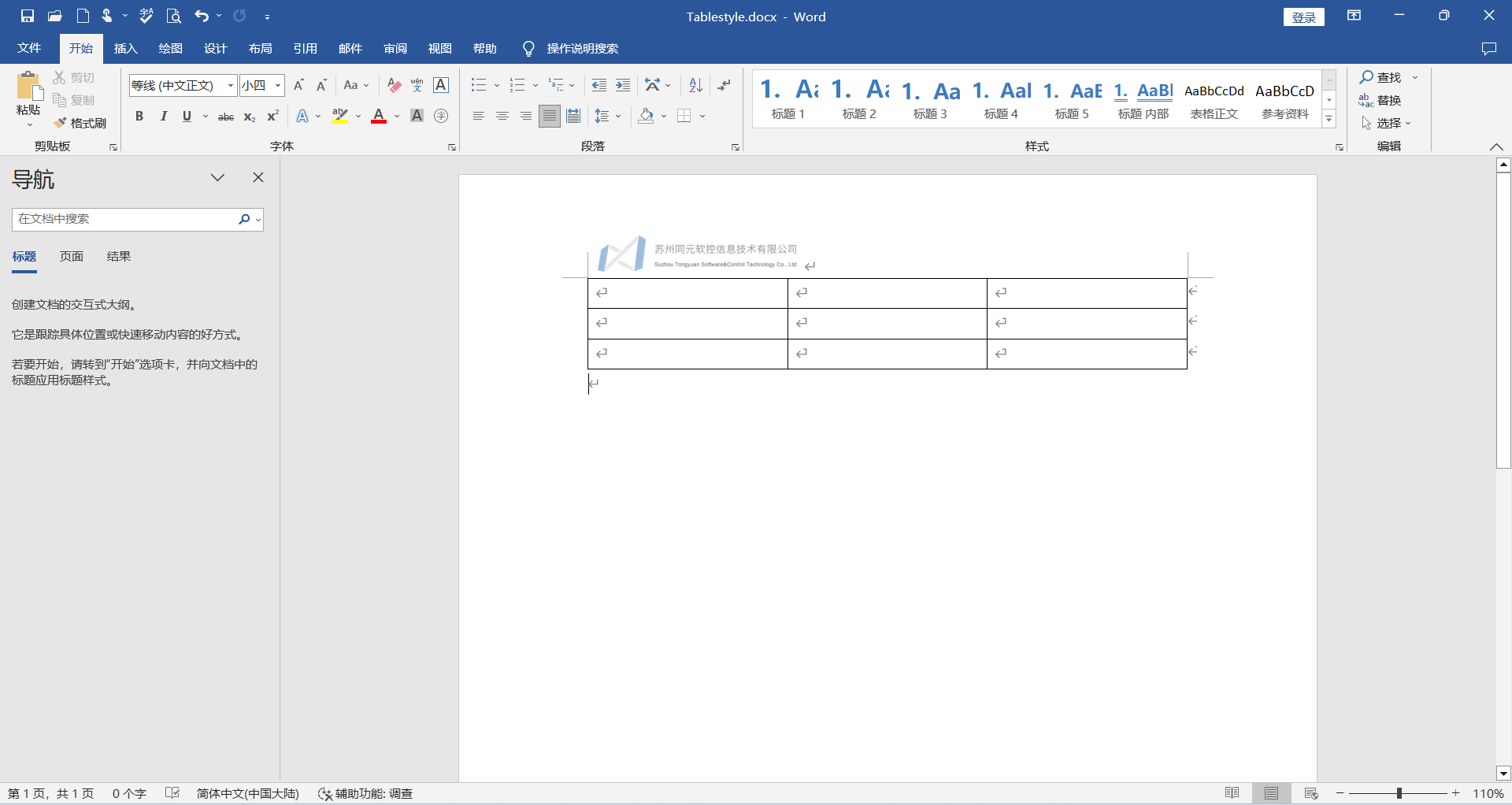
1.新建一个名为Tablestyle.docx的word文件并插入一个表格。
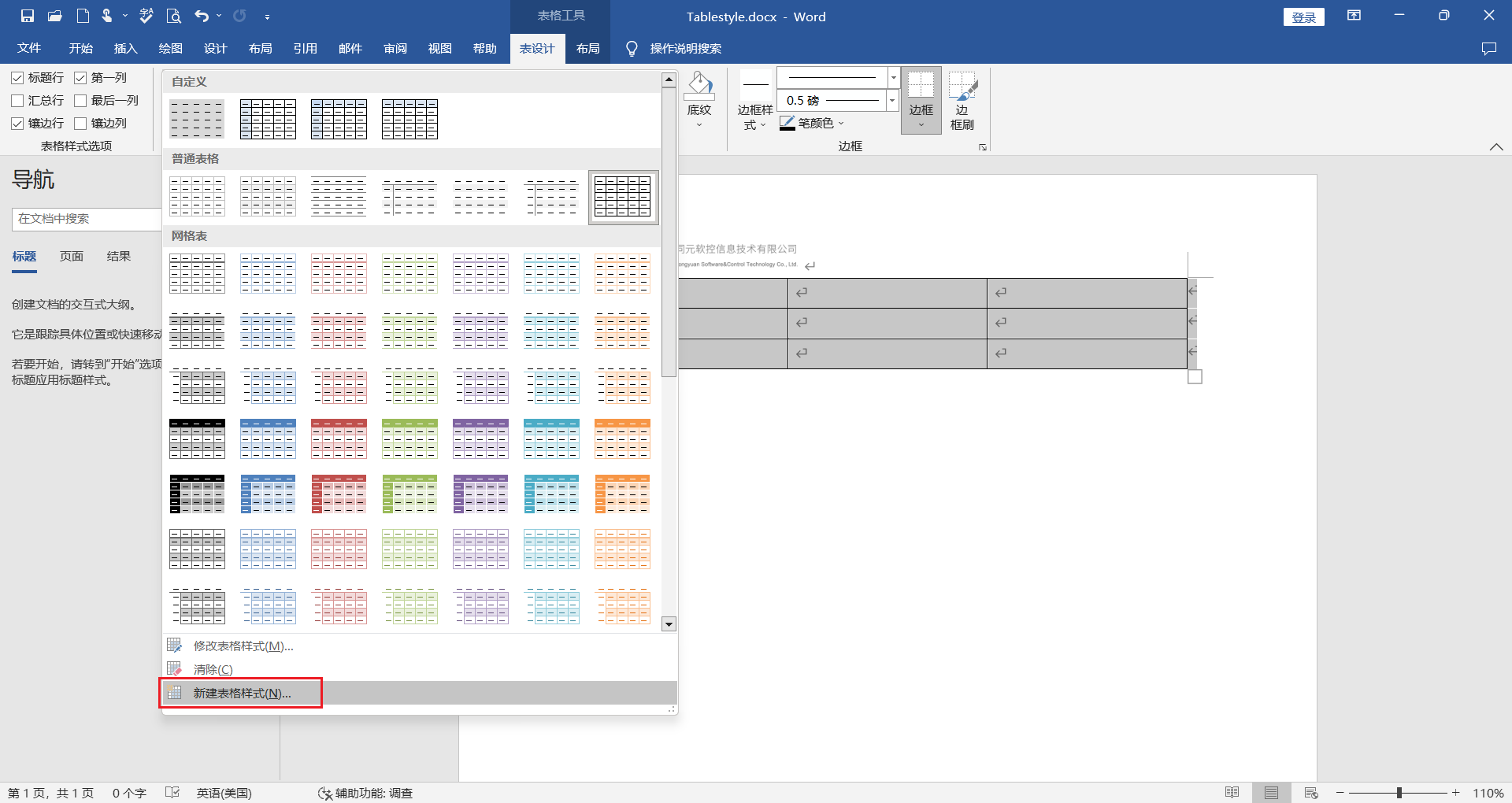
2.在“表设计”里面选择“新建表格样式”。
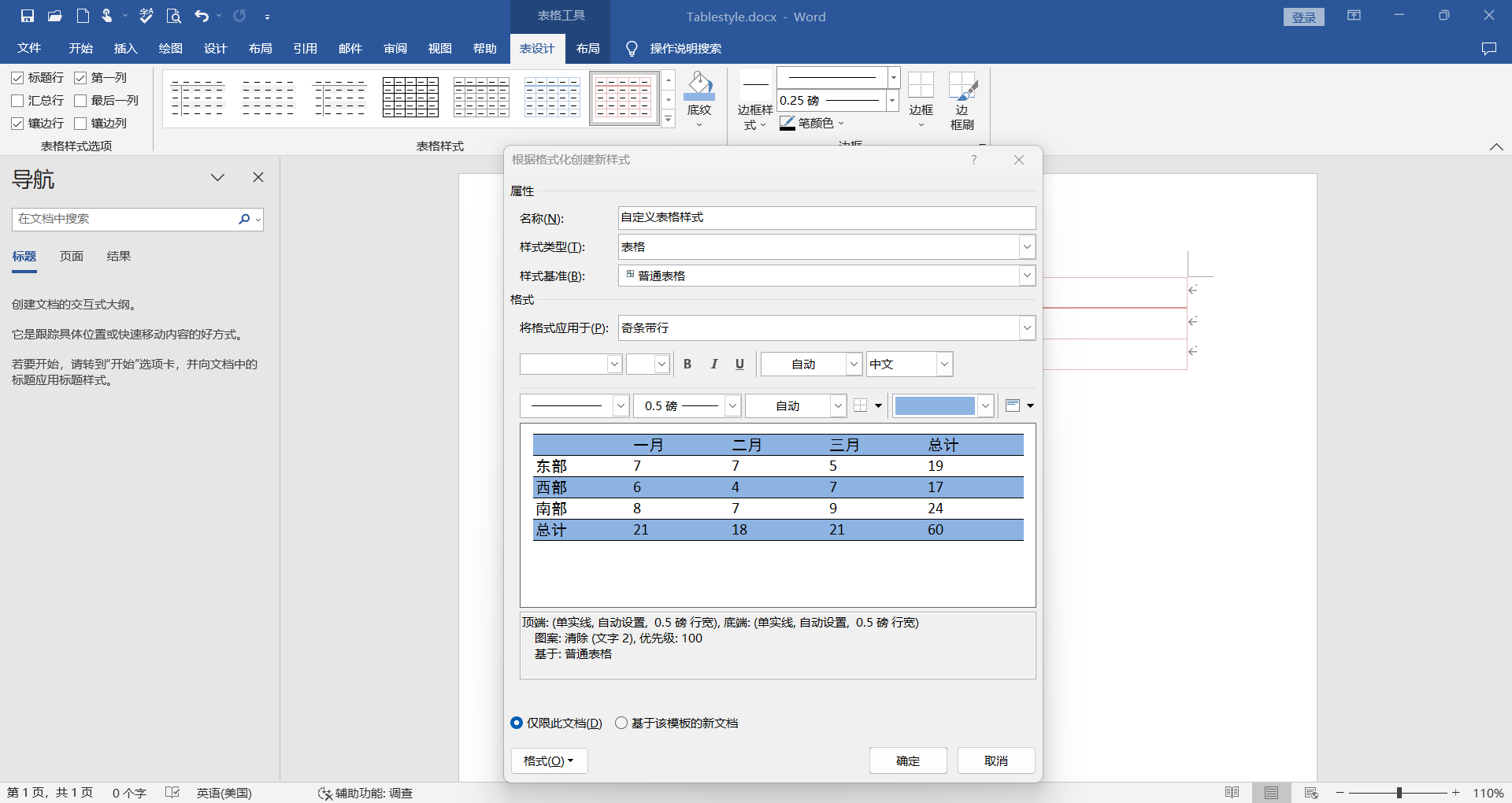
3.在“根据格式化创建新样式”页面中修改名称为“自定义表格样式”,设计自定义的表格格式,点击确定。
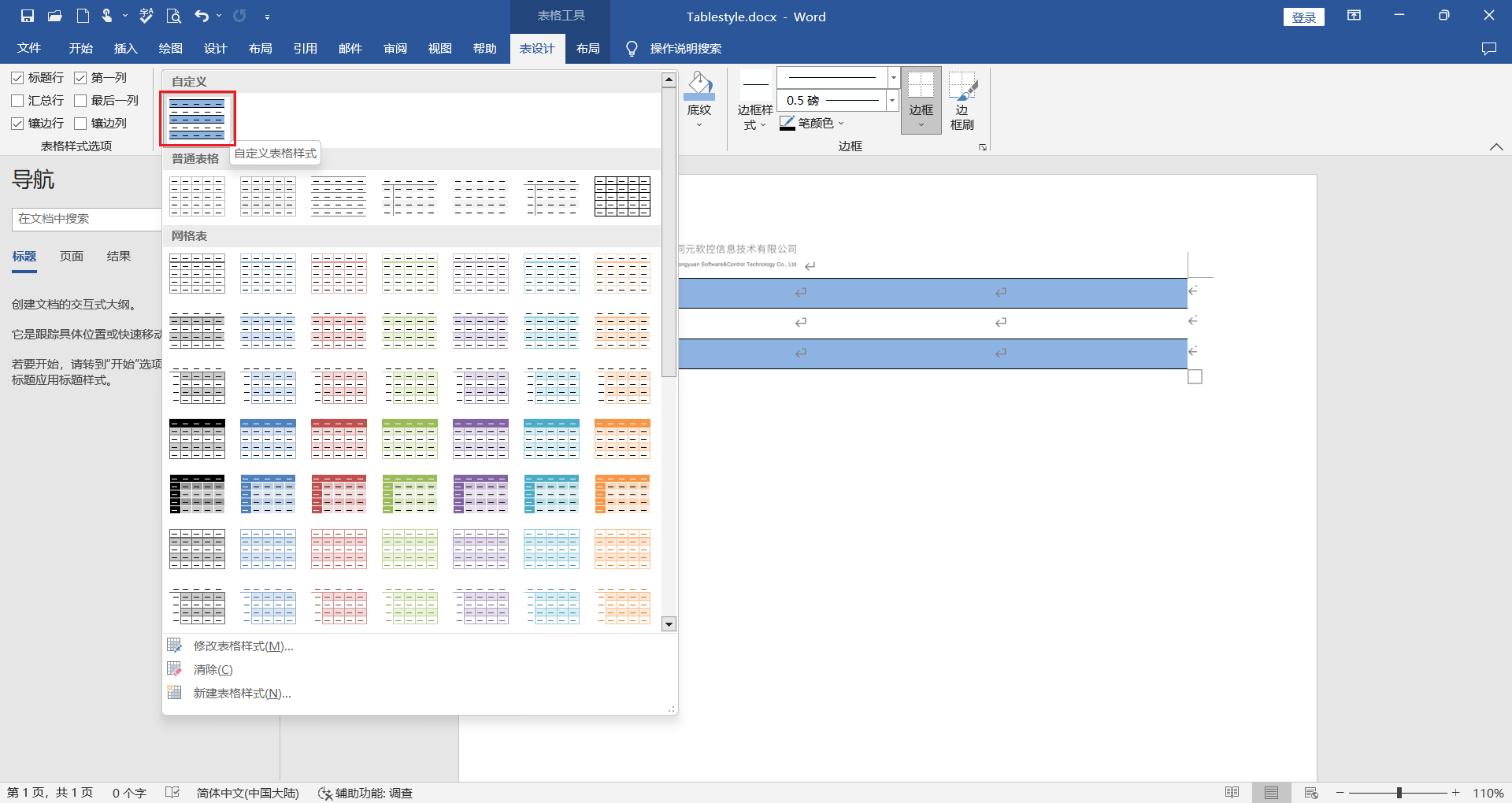
4.成功的在Tablestyle.docx文件中创建了一个名为“自定义表格样式”的表格样式。
5.保存Tablestyle.docx文件。
# 语法
style = Dict("style_type"=>"自定义表格样式")
# 示例
自定义表格样式
创建一个表格,设置表格样式为新建Tablestyle.docx文件中的“自定义表格样式”。本示例中,Tablestyle.docx文件存放在TyReportGenerator库的对应文件夹中。
using TyReportGenerator

doc = create_document()
pkg_dir = pkgdir(TyReportGenerator)
number = [1, 2, 3, 4, 5]
names = ["fft", "fftshift", "ifft", "ifftshift", "nextpow2"];
statements = [
    "傅里叶变换", "将零频分量移到频谱中心", "傅里叶逆变换", "将零频分量移到频谱中心", "2的更高次幂的指数"
];
tableData = [number, names, statements]

table = create_table(
    tableData;
    style=Dict(
        "style_type" => "自定义表格样式",
        "halign" => "center",
        "font_family" => "Times New Roman",
        "outer_margin" => (0, 0),
    )
)

add_table(doc, table)

doc_file = joinpath(tempdir(), "自定义表格样式.docx");
tpl_file = joinpath(pkg_dir, "examples/Resources/Tablestyle.docx"); #用户可以自定义路径
#生成文档报告
generate_report(doc, doc_file, tpl_file)
rptview(doc_file)
# 代码创建表格样式
报告生成支持通过代码创建表格样式
# 语法
create_tablestyle(table_name, style, border_top, border_bottom, border_left, border_right, border_insideh, border_insidev)
# 说明
代码创建表格样式支持对表格的属性修改为:
- 表格文本:字体、字号、加粗、对齐方式等属性
- 表格顶部边框:边框类型、边框尺寸、边框颜色
- 表格底部边框:边框类型、边框尺寸、边框颜色
- 表格左边边框:边框类型、边框尺寸、边框颜色
- 表格右边边框:边框类型、边框尺寸、边框颜色
- 表格水平内部边框:边框类型、边框尺寸、边框颜色
- 表格垂直内部边框:边框类型、边框尺寸、边框颜色
# 示例
代码创建表格样式
创建Word文档。
using TyReportGenerator

doc = create_document()

text=create_text(
"自定义表格样式";
    style=Dict(
        "bold" => true,
        "font_family" => "宋体",
    ))
add_paragraph(doc, text)
创建表格的边框。
border_top = create_tblborders(;
    border_style="double", border_size="8", border_color="auto"
)
border_bottom = create_tblborders(;
    border_style="double", border_size="8", border_color="auto"
)
border_left = create_tblborders(;
    border_style="none", border_size="8", border_color="auto"
)
border_right = create_tblborders(;
    border_style="none", border_size="8", border_color="auto"
)
border_insideh = create_tblborders(;
    border_style="single", border_size="8", border_color="auto"
)
border_insidev = create_tblborders(;
    border_style="none", border_size="8", border_color="auto"
)
创建表格样式,设置表格样式名称为“自定义表格样式”,设置表格文本属性和边框属性。
#创建表格样式
tablestyle = create_tablestyle(
    "自定义表格样式";
    style=Dict(
        "bold" => true, "halign" => "center", "font_size" => 8, "font_family" => "eastAsia"
    ),
    border_top=border_top,
    border_bottom=border_bottom,
    border_left=border_left,
    border_right=border_right,
    border_insideh=border_insideh,
    border_insidev=border_insidev,
)
add_tablestyle(doc, tablestyle)
创建一个表格,设置表格样式为“自定义表格样式”。
number = [1, 2, 3, 4, 5]
names = ["fft", "fftshift", "ifft", "ifftshift", "nextpow2"];
statements = [
    "傅里叶变换 (一维、二维、多维)", "将零频分量移到频谱中心", "傅里叶逆变换(一维、二维、多维)", "将零频分量移到频谱中心", "2的更高次幂的指数"
];
tableData = [number, names, statements]

table = create_table(
    tableData;
    style=Dict(
        "style_type" => "自定义表格样式",
        "halign" => "center",
        "color" => (0, 0, 255),
        "bold" => false,
        "font_family" => "Times New Roman",
        "outer_margin" => (0, 0),
    ),
)

add_table(doc, table)

doc_file = joinpath(tempdir(), "自定义表格样式.docx");
生成文档报告。
generate_report(doc, doc_file)
rptview(doc_file)
# 段落样式
# 自定义段落样式
报告生成支持在word中自定义段落样式
# 自定义段落样式过程
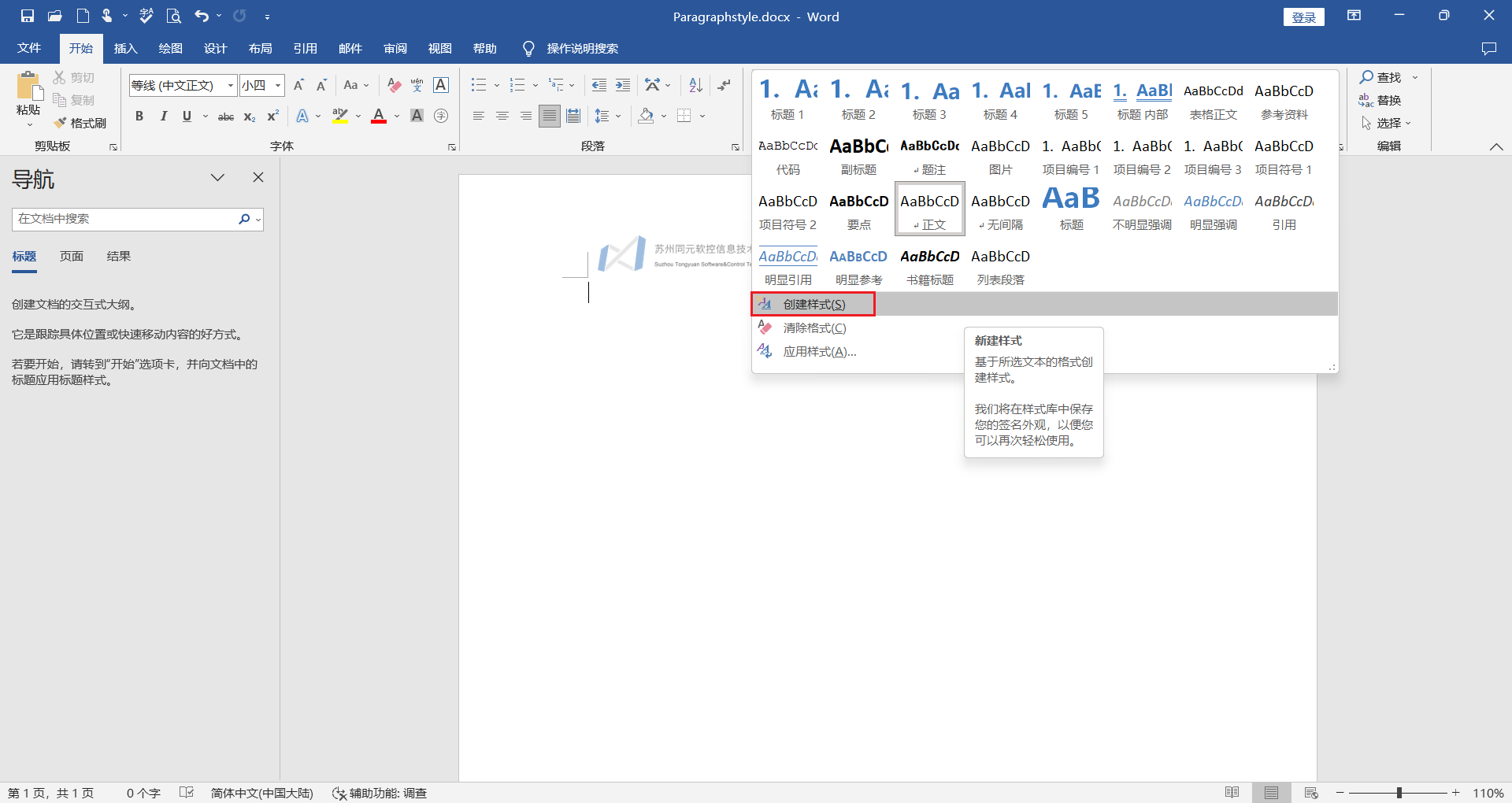
1.新建一个名为Paragraphstyle.docx的word文件,打开文件并点击创建样式。
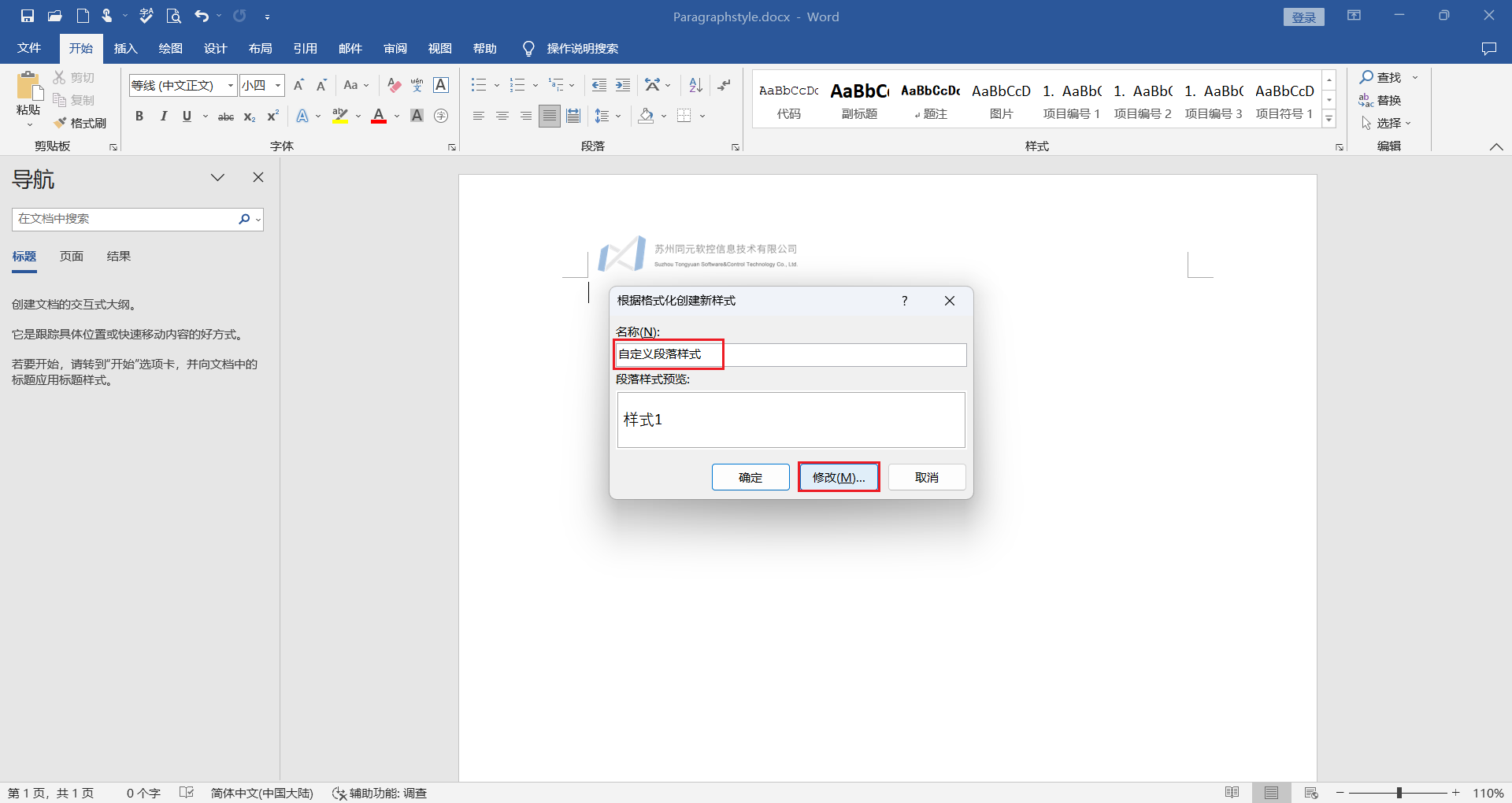
2.修改名称为“自定义段落样式”,点击“修改”对段落格式进行修改。
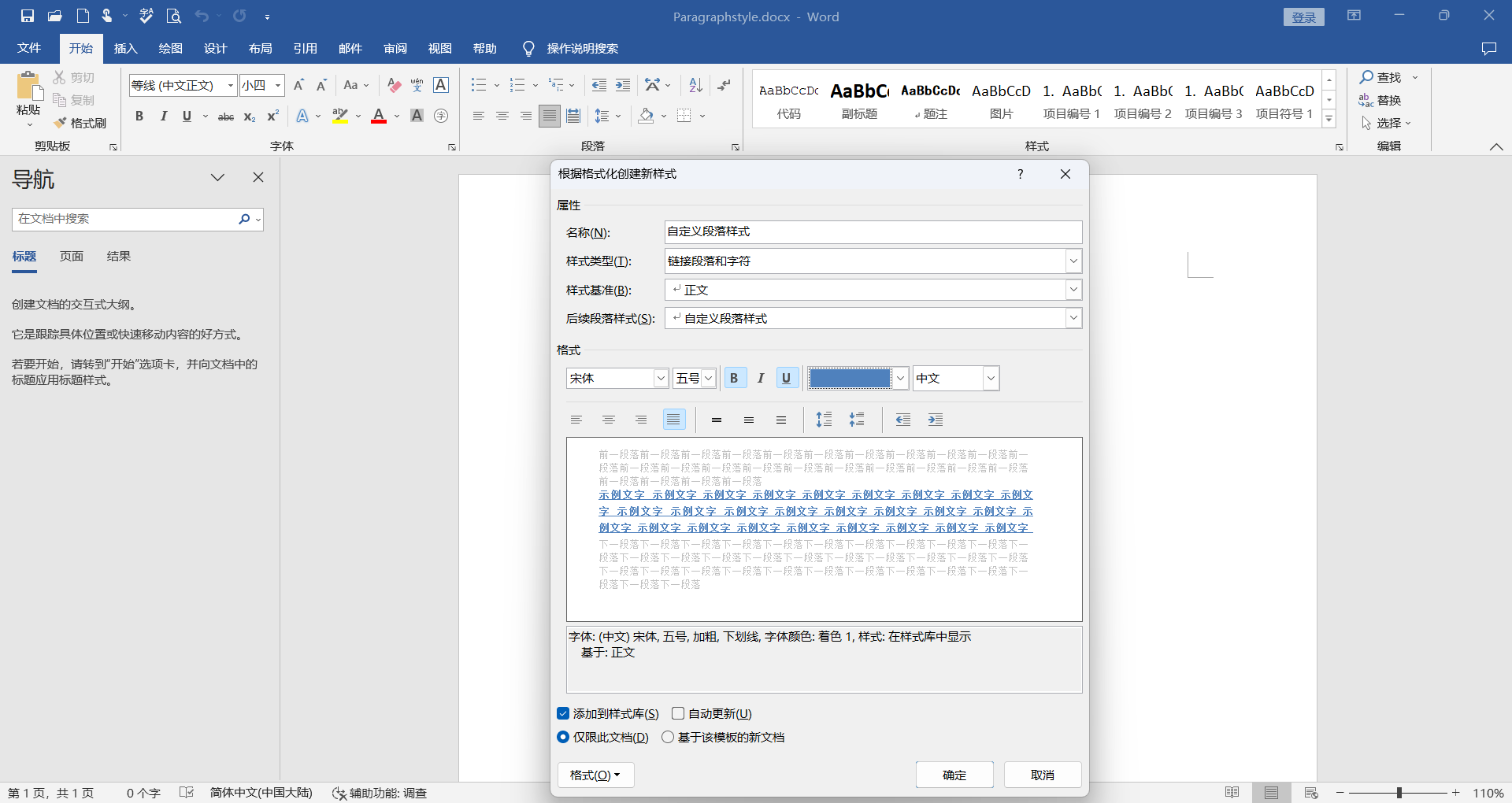
3.在“根据格式化创建新样式”页面中设计自定义的段落格式,点击确定。
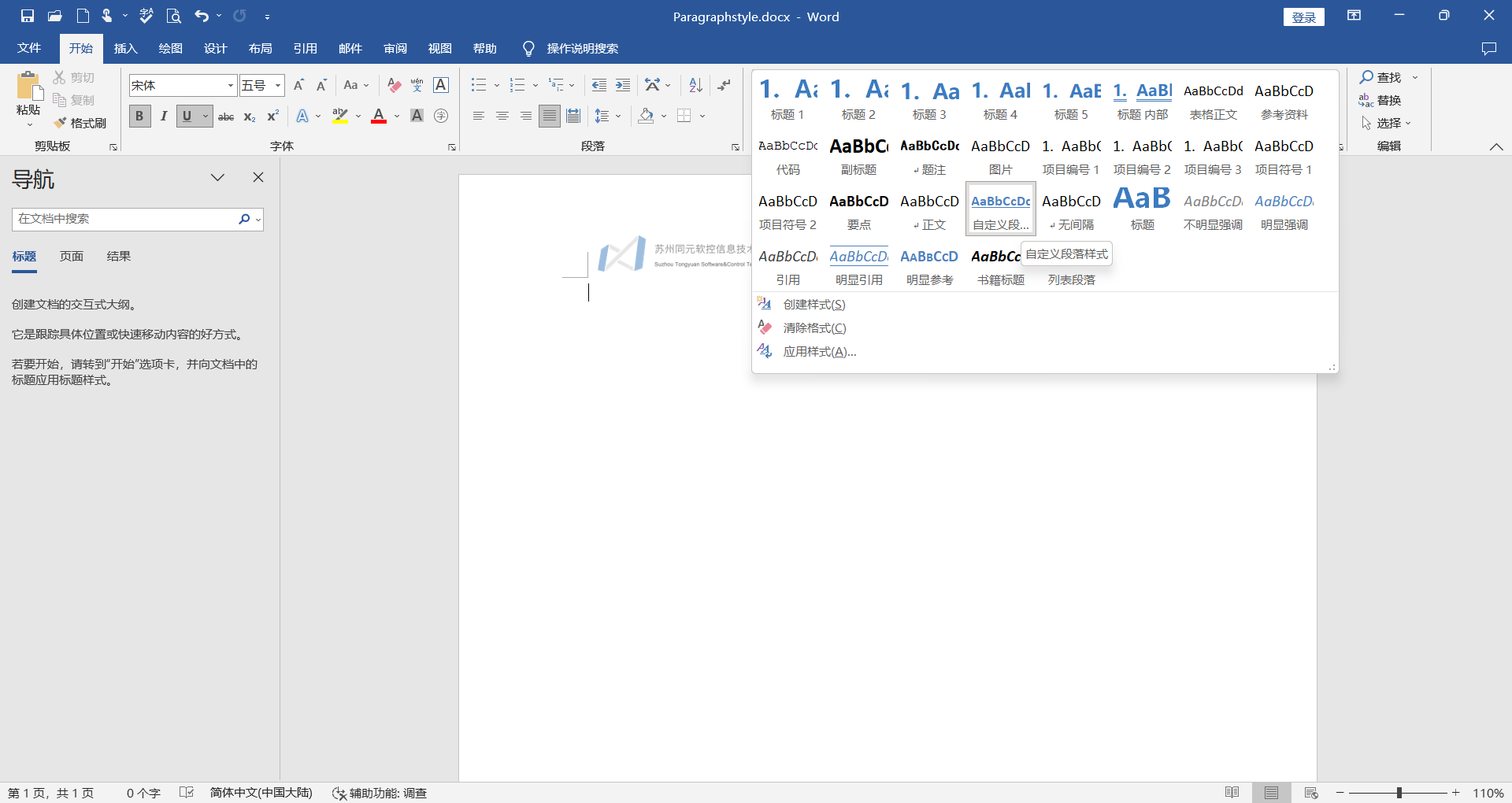
4.成功的在Paragraphstyle.docx文件中创建了一个名为“自定义段落样式”的段落样式。
5.保存Paragraphstyle.docx文件。
# 语法
style = Dict("style_type"=>"自定义段落样式")
# 示例
自定义段落样式
创建一个文本,设置样式为新建Paragraphstyle.docx文件中的“自定义段落样式”。本示例中,Paragraphstyle.docx文件存放在TyReportGenerator库的对应文件夹中。
using TyReportGenerator

doc = create_document()
pkg_dir = pkgdir(TyReportGenerator)

text = create_text("函数列表"; style=Dict("style_type" => "自定义段落样式"))

paragraph = add_paragraph(doc, text)

doc_file = joinpath(tempdir(), "自定表格.docx");
tpl_file = joinpath(pkg_dir, "examples/Resources/Paragraphstyle.docx"); #用户可以自定义路径

#生成文档报告
generate_report(doc, doc_file, tpl_file)
rptview(doc_file)
# 代码创建段落样式
报告生成支持通过代码创建段落样式
# 语法
create_paragraphstyle(paragraph_name; base_style, style)
# 说明
代码创建段落样式支持以现有段落样式为样式基准,对新创建段落样式的文本属性进行修改。
# 示例
自定义段落样式
创建Word文档,以Heading 2为样式基准,修改自定义段落样式字体为红色、加粗。生成文档报告。
using TyReportGenerator

doc = create_document()
#创建段落样式
paragraphstyle = create_paragraphstyle(
    "自定义标题样式"; base_style="Heading 2", style=Style(; color=(255, 0, 0), bold=true)
)
add_paragraphstyle(doc, paragraphstyle)

text = create_text("函数列表"; style=Dict("style_type" => "自定义标题样式","bold" => true ))

paragraph = add_paragraph(doc, text)

doc_file = joinpath(tempdir(), "自定表格.docx");

#生成文档报告
generate_report(doc, doc_file)
rptview(doc_file)