# phased_Platform
模型平台运动
函数库: TyPhasedArray
# 说明
phased_Platform 系统对象模拟空间中一个或多个平台的平移运动。平台可以是车辆或飞机等目标,也可以是声纳或雷达发射器和接收器。该模型假设平台在每个模拟步骤中以恒定速度或恒定加速度进行平移运动。位置和速度始终在全局坐标系中定义。
为移动平台建模:
使用构建过程定义并设置平台;
重复调用 step 方法,使平台沿 phased_platform 属性确定的路径移动。step 的行为针对工具箱中的每个对象。
# 构造
sPlat = phased_Platform() 创建一个平台系统对象 sPlat。该对象模拟了一个静止的平台,其位置位于原点,速度设为零。
sPlat = phased_Platform(; Name = Value) 创建一个对象 sPlat,其中每个指定的属性 Name 都设置为指定的 Value。您还可以按任意顺序指定其他名称-值对参数 (;Name1=Value1,...,NameN=ValueN)。
运动模型可以是恒定速度、恒定加速度或自定义轨迹。您可以使用 MotionModel 属性从两种运动模型中选择一种。
| MotionModel 值 | 使用方法 |
|---|---|
| "Velocity" | 如果将 VelocitySource 属性设置为 "Property",平台将以由 Velocity 属性决定的恒定速度移动。您可以指定 InitialPosition 属性,也可以将其保留为默认值。您可以在任何模拟步骤中更改可调整的 Velocity 属性。 如果将 VelocitySource 属性设置为 "Input port",则可以输入瞬时速度作为 step 方法的参数。使用 InitialPosition 属性指定初始位置,或将其设为默认值。 |
| "Acceleration" | 将 AccelerationSource 属性设置为 "Property" 后,平台将以由 Acceleration 属性决定的恒定加速度移动。您可以指定 InitialPosition 和 InitialVelocity 属性,或将其保留为默认值。您可以在任何模拟步骤中更改可调整的 Acceleration 属性。 如果将 AccelerationSource 属性设置为 "Input port",则可以输入瞬时加速度作为 step 方法的参数。指定 InitialPosition 和 InitialVelocity 属性,或将其保留为默认值。 |
| "Custom" | 使用 CustomTrajectory 属性中的一系列航点指定平台运动。 |
# 属性
| 属性 | 说明 |
|---|---|
| MotionModel | 对象运动模型 对象运动模型,指定为 "Velocity"、"Acceleration" 或 "Custom"。将此属性设置为 "Velocity" 时,平台在每个模拟步骤中都将遵循恒定的速度轨迹。将该属性设置为 "Acceleration" 时,平台在每个模拟步骤中都会遵循恒定的加速轨迹。如果将该属性设置为 "Custom",平台运动将遵循 CustomTrajectory 属性指定的一系列航点。该对象会对航点执行一次片断三次插值,以得出每个时间步的位置和速度。 默认: "Velocity" |
| InitialPosition | 平台初始位置 平台的初始位置,指定为 [x; y; z] 形式的 3 × 1 实值列向量或 3 × N 实值矩阵(N 为平台个数)。每列的形式为 [x; y; z]。位置单位为 m。 默认值:[0; 0; 0] |
| InitialVelocity | 平台初速度 平台初速度,指定为 [vx; vy; vz] 形式的 3 × 1 实值列向量,或 3 × N 实值矩阵(N 为平台个数)。每列的形式为 [vx; vy; vz]。速度单位为 m/s。 该属性仅适用于将 MotionModel 属性设置为 "Velocity" 且 VelocitySource 设置为 "Input port" 时,或将 MotionModel 属性设置为 "Acceleration" 时。 默认值:[0; 0; 0] |
| VelocitySource | 速度数据源 速度数据源,指定为 "Property" 或 "Input port" 之一。将此属性值设置为 "Property" 时,使用 Velocity 属性设置速度。如果将此属性设置为 "Input port",则使用 step 方法的输入参数设置速度。 将 MotionModel 属性设置为 "Velocity" 时,此属性也适用。 默认:"Property" |
| Velocity | 平台当前速度 以 [vx; vy; vz] 形式的 3 × 1 实值列向量或 3 × N 实值矩阵(用于多个平台)指定平台的当前速度。每列的形式为 [vx; vy; vz]。速度单位为 m/s。维数 N 是平台的数量。 将 MotionModel 属性设置为 "Velocity",并将 VelocitySource 设置为 "Property" 时,该属性将适用。此属性可调。 默认值:[0; 0; 0] |
| AccelerationSource | 加速度数据源 加速度数据源,指定为 "Property" 或 "Input port" 之一。将此属性值设置为 "Property" 时,使用加速度属性指定加速度。将此属性设置为 "Input port" 时,可使用 step 方法的输入参数设置加速度。 此属性适用于将 MotionModel 属性设置为 "Acceleration" 时。 默认:"Property" |
| Acceleration | 平台加速度 将平台当前加速度指定为形式为 [ax; ay; az] 的 3 × 1 列实数向量,或每列形式为 [ax; ay; az] 的 3 × N 实数矩阵。维数 N 是平台的数量。加速度单位为 m/s/s。 如果将 MotionModel 属性设置为 "Acceleration",且 AccelerationSource 设置为 "Property",则此属性将适用。此属性可调。 默认值:[0; 0; 0] |
| CustomTrajectory | 自定义轨迹航点
以 M × L 矩阵或 M × L × N 数组形式指定的自定义轨迹航点。M 是航点数量。L 为 4 或 7。
将 CustomTrajectory 属性设置为三维数组时,页面数 N 代表平台数。时间单位为 s,位置单位为 m,速度单位为 m/s。 要启用此属性,请将 MotionModel 属性设置为 "Custom"。 |
| ScanMode | 机械扫描模式 平台的机械扫描模式,指定为 "None"、"Circular "或 "Sector",其中 "None" 为默认值。将 ScanMode 属性设置为 "Circular" 时,平台将沿平台方位轴的方位角方向连续顺时针扫描 360°。将 ScanMode 属性设置为 "Sector" 时,平台会在 AzimuthSpan 属性指定的范围内沿平台方位轴的方位角方向顺时针扫描。当平台扫描到达跨度限值时,扫描会反转方向,扫描回另一个扫描限值。扫描在平台方位轴范围内进行。 |
| InitialScanAngle | 平台初始扫描角度 平台的初始扫描角度,指定为 1 × N 的向量,其中 N 为平台个数。扫描在平台的本地坐标系中进行。InitialOrientationAxes 指定了原始本地坐标系。模拟开始时,InitialOrientationAxes 指定的方向轴将按照 InitialScanAngle 属性指定的角度旋转。默认值为零。单位为度。该属性适用于将 ScanMode 属性设置为 "Circular"或 "Sector"时。 示例:[30 40] |
| AzimuthSpan | 方位角跨度 方位角跨度,以 N × 2 矩阵形式指定,其中 N 为平台数量。矩阵的每一行以 [ScanAngleLowerBound ScanAngleHigherBound] 的形式指定相应平台的扫描范围。默认值为 [-60 60]。单位为 °。要启用此属性,请将 ScanMode 设置为 "Sector"。 |
| AzimuthScanRate | 方位扫描率 方位角扫描速率,指定为 1 × N 的向量,其中 N 是平台的数量。向量中的每个条目都是相应平台的方位角扫描速率。默认值为 10 °/s。单位为 °/s。要启用此属性,请将 ScanMode 属性设置为 "Circular" 或 "Sector"。 |
| InitialOrientationAxes | 平台初始方位轴 平台的初始方位轴,对于单个平台指定为 3 × 3 实值正交矩阵,对于多个平台指定为 3 × 3 × N 实值矩阵。维数 N 是平台的数量。当方位矩阵为 3 × 3 时,三列代表本地坐标系的坐标轴 (xyz)。当方向矩阵为 3 × 3 × N 时,对于每个页面索引,生成的 3 × 3 矩阵代表一个本地坐标系的轴。 默认值:[1 0 0; 0 1 0; 0 0 1] |
# 方法
| step | 输出平台的当前位置、速度和方向轴 |
# 示例
模拟平台运动
在原点创建一个速度为每秒 (100, 100, 0) m 的平台。模拟平台在两个时间步长内的运动,假设每个步长的时间为 1 s。平台的位置在每一步之后更新。
using TyPhasedArray

sPlat = phased_Platform(; pos=[0; 0; 0], vel=[100; 100; 0])
T = 1
在第一次调用 step 时,位置处于初始值。
pos = step(sPlat, T)
pos[1] = 3-element Vector{Int64}:
 0
 0
 0
在第二次调用 step 时,位置发生了变化。
pos = step(sPlat, T)
pos[1] = 3-element Vector{Int64}:
 100
 100
   0
盘旋飞机运动模型
设置初始条件:
using TyPhasedArray
using TyPlot
using TyBase
range = 10000
alt = 20000
initPos = [cosd(60) * range; sind(60) * range; alt]
originPos = [1000, 1000, 0]
originVel = [0, 0, 0]
vs = 150.0
phi = atand(initPos[2] - originPos[2], initPos[1] - originPos[1])
phi1 = phi + 90
vx = vs * cosd(phi1)
vy = vs * sind(phi1)
initVel = [vx, vy, -20]
platform = phased_Platform(;
    MotionModel="Acceleration",
    AccelerationSource="Input port",
    InitialPosition=initPos,
    InitialVelocity=initVel,
    OrientationAxesOutputPort=true,
    InitialOrientationAxes=eye(3),
)

relPos = initPos - originPos
relVel = initVel - originVel
rel2Pos = [relPos[1], relPos[2], 0]
rel2Vel = [relVel[1], relVel[2], 0]
r = sqrt(rel2Pos' * rel2Pos)
accelmag = vs^2 / r
unitvec = rel2Pos / r
accel = -accelmag * unitvec
计算轨迹:
以 T = 0.5 s 的间隔计算 1000 个积分步的轨迹。
T = 0.5
N = 1000

posmat = zeros(3, N)
r1 = zeros(N)
v = zeros(N)
for n in 1:N
    global accel
    global oax
    global originPos
    global posmat
    pos, vel, oax = step(platform, T, accel)
    posmat[:, n] = pos
    vel2 = vel[1]^2 + vel[2]^2
    v[n] = sqrt(vel2)
    relPos = pos - originPos
    rel2Pos = [relPos[1], relPos[2], 0]
    r = sqrt(rel2Pos' * rel2Pos)
    r1[n] = r
    accelmag = vel2 / r
    accelmag = vs^2 / r
    unitvec = rel2Pos / r
    accel = -accelmag * unitvec
end
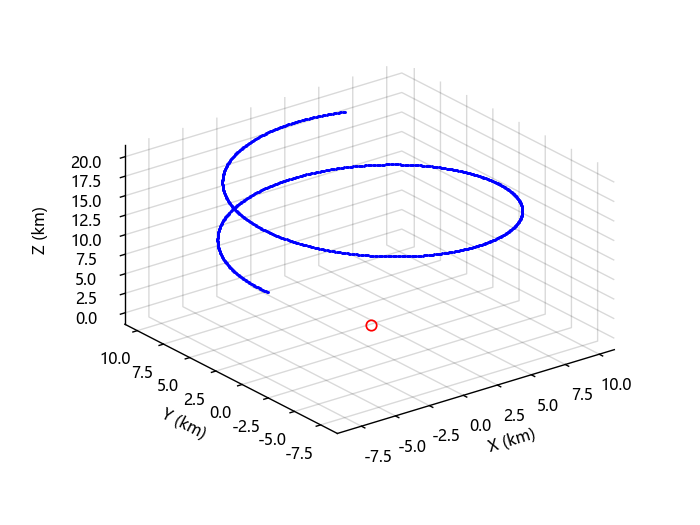
绘制轨迹:
posmat = posmat / 1000
figure(1)
plot3(posmat[1, :], posmat[2, :], posmat[3, :], "b.")
hold("on")
plot3(originPos[1] / 1000, originPos[2] / 1000, originPos[3] / 1000, "ro")
xlabel("X (km)")
ylabel("Y (km)")
zlabel("Z (km)")
grid("on")
hold("off")
使用航点定义平台运动
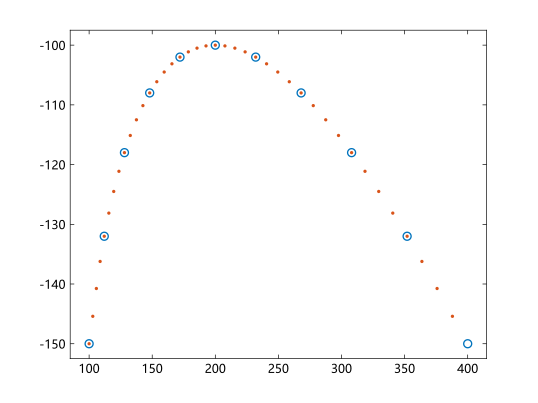
根据抛物线运动创建航点。
using TyPhasedArray
using TyPlot
x0 = 100
y0 = -150
z0 = 0
vx = 5
vy = 10
vz = 0
ax = 1
ay = -1

t = collect(0:2:20)
x = @. x0 + vx * t + ax / 2 * t^2
y = @. y0 + vy * t + ay / 2 * t^2
z = z0 * ones(size(t))
wpts = [t x y z]
创建一个平台对象,使用航点确定其运动轨迹。
pltfm = phased_Platform(; MotionModel="Custom", CustomTrajectory=wpts)
tstep = 0.5
nsteps = 40
X = zeros(40, 3)
以 0.5s 为一个时间步长推进平台。
for k in (1:nsteps)
    global X
    pos, vel = step(pltfm, tstep)
    X[k, :] = pos'
end
plot(x, y, "o")
hold("on")
plot(X[:, 1], X[:, 2], ".")
hold("off")